
A month ago I wrote about some myths and misconceptions about the differences between RAW and JPG formats. And at the end of that article I asked of RAW, “Is the quality really better?” Continue reading to find out what I learned. The answer may surprise you.
I wanted to see if there was a noticeable quality difference between a RAW image and a JPG produced by the camera. I setup a test scene and shot it twice from a tripod: once using RAW format and once using the highest quality JPG setting. In-camera processing settings were set to: Tone +1, Sharpness +1, Saturation enhanced. The RAW image was processed using Nikon Capture NX. No additional sharpening or noise reduction was applied to the images.
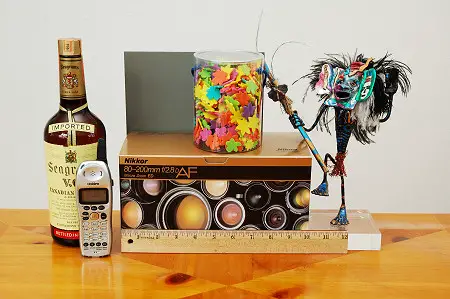
Test scene
Conventional wisdom says that opening a JPG and re-saving it reduces quality. That’s because JPG files use a form of compression that actually throws away some of the image information (thus “lossy” compression). I was curious how bad it actually was in practice. So, as a third test, I opened and re-saved the camera JPG ten times using the highest-quality JPG compression setting.
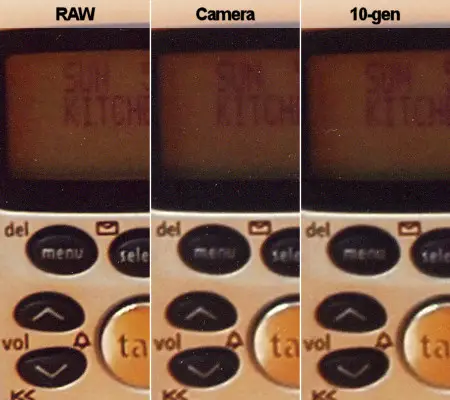
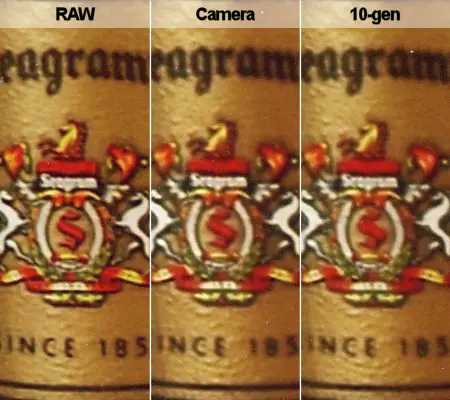
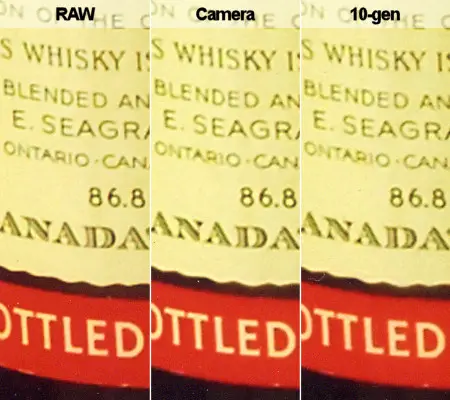
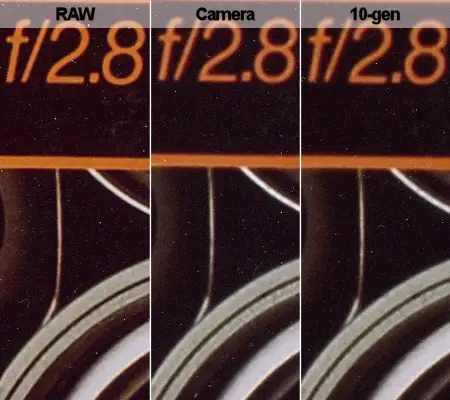
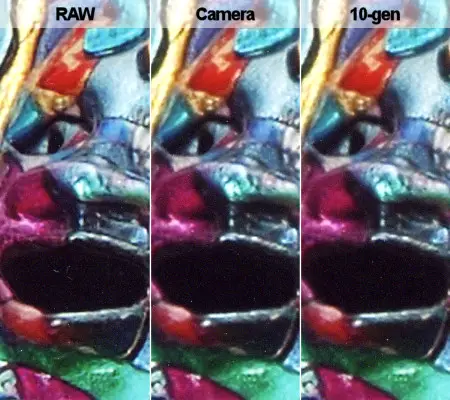
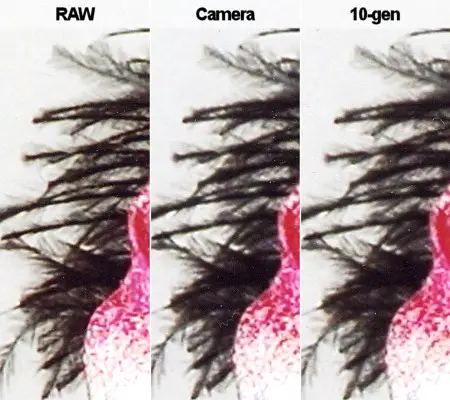
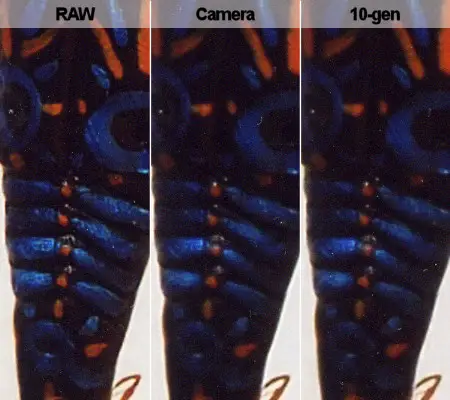
All three of these images were then sent to the same lab (ezprints.com) who produced three 11×14 matte prints for me. Each of the images below show a full-resolution (300ppi) scanned sample from each of the prints. “RAW” is the RAW format image, “Camera” is the in-camera JPG version, and “10-gen” is the JPG opened and re-saved ten times.
See if you can spot the differences.
Conclusions
It’s clear from the examples that the RAW image provides superior sharpness and resolution. It’s most noticeable in areas of fine detail like the feathers but the RAW image also appeared to provide better definition and contrast, especially in darker areas of the photo.
But what’s it like looking at the actual print? When viewing these at a distance of about 5 feet they are completely identical. I think that’s important because it applies to how most people will view prints like this in real life. Most people aren’t going to get out loupes and examine them as closely as I have in this article (especially if they’re hanging on a wall).
At closer than five feet, I can spot the RAW print but I still can’t distinguish between the JPG prints. I have to bring the prints to within about 20 inches to distinguish between all three.
I asked a few non-photographers to look at all three prints as well. The first impression from everyone was that I was trying to trick them. They thought they were identical. I had to tell people exactly what to look for and let them examine all three prints side by side before they could find any noticeable difference.
It’s clear to me from this test that RAW does provide better sharpness and detail than an in-camera JPG. If you absolutely must have the best possible print then you must shoot in RAW. Most people, however, can happily shoot in JPG mode without worrying about any noticeable difference in print quality.
As an added bonus, I was pleasantly surprised to find that the lossy JPG problem isn’t nearly as bad as it sounds. Despite the compression, JPG files can tolerate a number of generations before any quality issues arise.





I find this very informative. Thanks a lot. Is there any chance that RAW images are more responsive to photo-manipulation?
What does it mean to say that “The RAW image was processed using Nikon Capture NX. No additional sharpening or noise reduction was applied to the images.” I am not familiar with Nikon Capture NX and I don’t know if it has a default sharpening level which is greater than 0 as the Adobe RAW converter does. In the the Adobe RAW converter, if you leave the default settings, then you ARE applying sharpening even if you don’t change anything; if you want no sharpening then you have to set this value to 0 (I think the default is 25, but I don’t remember for sure.) … Just a thought that it’s possible you applied sharpening to your RAW image without realizing it?
Another possibility is that you shot with a (relatively) high ISO and, without you knowing it, the camera applied some noise reduction to the JPG which would reduce the overall sharpness. I don’t know for your camera at what ISO it starts to apply noise reduction, but you could look this up. If this happened, then it wouldn’t be surprising that the JPG image would be softer than the RAW image.
Alternatively, if it’s true that the RAW image IS sharper… why do you think this is? This would be a surprising result, especially given that you had the sharpening level set to +1. Do you think that when the image is compressed to JPG that it loses edge detail? I would think that edge sharpness is actually something that would be emphasized, but maybe not?
Thanks a lot for doing this work and publishing it.
It looks like you’ve come to the same conclusion I have recently, RAW isn’t THAT much better than JPEG. And they’re usually not worth the effort and storage unless you’re trying to print very big with close viewing or going to crop tremendously. I just came back from a week’s vacation where I shot most everything in RAW+JPEG (Panasonic FZ30 always creates JPEG when you choose RAW) and didn’t find the RAW were any better than the JPEGs.
Additionally, the JPEGs used the white balance that’d I’d selected, giving it the color tone I wanted in each shot, rather than the RAW that applied white balance afterwards (and was often skewed from what I wanted).
So it’s JPEGs for me from now on unless I’m planning major cropping or REALLY big prints that folks are going to get close to.
Nikon Capture NX is Nikon’s standard RAW processing software. I used it for this test since I was processing a Nikon RAW file and I wanted to avoid any potential concerns along the lines of “NX processes NEF’s better than other RAW converters.”
In-camera noise reduction was off for both shots. The exposure was 1/60s at f/8 with plenty of light, ISO 200 for both shots.
No additional sharpening or noise reduction was done in NX. I specifically made sure all of those settings were disabled. That means that NX took the RAW data and applied the same level of in-camera sharpening as the camera applied when it created the JPG.
Most DSLR sensors record distinct RGB values but not all at the same point. A RGB value is interpolated for each pixel in the image. How those values are created and converted to a JPG is where the magic happens.
The reason the RAW file is marginally sharper has to do with the RAW processing engine. That’s what converts the 12-bit RAW data to a JPG. In one case you’ve got a software processing engine with the power of a desktop computer. And in the other (in-camera) you’ve got an engine with very little computing power. The in-camera processing engine simply isn’t as sophisticated or as powerful as the software processing engine which (apparently) does a better job at retaining fine detail during the conversion.
I encourage you to do your own test if your camera supports RAW images. Shoot a scene once in RAW and once in JPG fine and compare the two images at 100% magnification on your computer screen. The differences will be apparent on-screen.
The point of this article is that, although there are differences, they are fairly minor and don’t affect most people in a practical way.
Interesting! Thanks for your response – that cleared a lot up for me.
Your article contains a serious technical error.
Opening and re-saving the JPEG ten times without modification will not produce any effect because the data has already been processed by the JPEG algorithm and will neatly compress back through the algorithm without any additional degradation.
For a pathological example, tweak the curves with each iteration. This will screw with the luminescence discrete fourier transformation, and each step will decrease in quality.
As an example, I took an average image that I selected for having a decent tonal range and some high frequency data (JPEG’s enemy.) It’s not super-sharp because it was a handheld shot through glass. I processed the .NEF raw file into a 16 bit tiff. I took a 100% crop, saved a lossless copy as PNG. I then ran it through 10 iterations of the JPEG algorithm, changing the curves and color balance up in one iteration, down in another, and resaved it using “level 8” in photoshop JPEG to increase the compression level to levels where the loss would be clearly visible.
Original: losslessly compressed PNG
http://valine.org/pics/forum/00.png
First step JPEG:
Tenth step JPEG:
Notice: 1) loss of detail in high frequency regions 2) posterization of sky
First step JPEG:
http://valine.org/pics/forum/01.jpg
Tenth step JPEG:
http://valine.org/pics/forum/10.jpg
Oops, I meant to say “Discrete Cosine Transformation,” which is a different operation than the Fourier Transformation. I work with the FT in my research, so it was a slip of habit. 🙂
Ian, thanks for the correction. I’ll probably do a more formal print followup following your procedure to compare the in-camera JPG vs. a 10-gen JPG.
Ditto what Ian Rees has said. Merely opening and re-saving the JPG file several times should produce NO difference or degradation. “Lossy” JPG compression should only degrade (or further compress) if the file is edited in some way between saves. Otherwise, the re-save should have no effect.
By the way, nice article with a very level-headed view of what is, for some people, an inexplicably touchy and controversial subject. I have added a link to your article in my own article about the subject, which expresses a similar viewpoint (www.roguepaddler.com/camform.htm).
I can only agree with the conclusions in this article. But there is more to it. I found in a similar side-by-side comparison that the in-camera processing (in this case a Lumix FZ30) introduced tiny JPEG blocking artifacts even in HQ mode, which are probably also part of the reasons for the reduced resolution observed above. Interesting enough, when I shot RAW files, processed them in Adobe Dark Room and saved them as JPG at 80% quality setting, I got 50% smaller JPG files than what comes off the camera AND had no detectable blocking artifacts whatsoever! Further compressing the camera JPEGs with ACDSee didn’t introduce more artifacts, but also didn’t fix what the in-camera processor had messed up, needless to say. So I remained with a net gain of some 25% in file size when using the external RAW->JPG path.
See for yourself at http://www.flickr.com/photos/madinisrael/sets/72157594296470164/
The main benefit of using RAW (I shoot D2X and process in Nikon Capture 4) is that the files can be REALLY twisted and perfected. If you are shooting to your histogram, and not clipping your highlights, you can get a stunning image by lifting your midtones using curves, and or increasing contrast etc.
You can also generate two files from the original and merge “exposures” which can help a lot.
If you do all this in RAW, you are keeping the original file pristine, and getting much better results. RAW files can take a huge amount of punishment compared to drum scanned film or JPGs… If you are starting with a JPG you are just limiting what you can do to optimise the file by ‘handycapping’ your start position.
And of course you can then do a lot of stuff in Photoshop, even at 16bit now…
My experience is that you can get the equivalent of a 6×9 film camera out of a D2X, or a 6×4.5 from a D70, if you are really carefull with your workflow.
Of course you end up with a lot more data to store.
I think we can use both Raw and Jpeg, when I take family pictures I prefer JPG, because in the future I want my children to be able to pop the CD and see the pictures and print them. In Raw you never know, you are actually taking a chance if the file can be read 20-30 years from now.
If I want a art photo and I want to tweak this thing in PS CS2 and planing to make a fine art large print from it i will shoot Raw. But I know some professional photographers who take 10000s of 10000s of pictures only shoot in JPG. Processing all these pics will make you insane. How about making a great shot in the first place as a real photographer rather than trying to fix your boo boo in photoshop.
So I shoot 90% JPG and 10% Raw
So I wonder what would happen if you printed at 16×20 or even larger and ran this test. Is there a difference in RAW vs JPEG at very large sizes like this if you have a modest 6Mp or 8MP DSLR? Can I get larger high quality enlargements with RAW vs JPEG?
Finally, concrete samples of what RAW and JPG actually look like; thanks a million for taking the time to build such a good dossier on the subject. In just a couple of photos, you have demonstrated the Pros and the Cons of both formats.
Thanks again.
The “conventional wisdom” about how re-saving a jpeg loses quality is a complete myth.
JPEG compression is only re-applied to an image who’s data is either manipulated or re-cropped with a top left cropping coordinate that is not a multiple of 8. That’s right, you can even re-crop a jpeg without losing quality, provided you pick a top left point that is a multiple of 8 so as to not break the 8×8 grid division that JPEG internally uses to sample the image. If you do nothing to the image and simply re-save it, no compression would be applied. If this isn’t the case, your image editing program should be deleted immediately because it’s very obvious/easy for software to decide not to re-compress an image if nothing has changed.
This is actually all very well documented in the wiki article on JPEGs (http://en.wikipedia.org/wiki/JPEG).
I’m glad you asked non-photographers as they are, in some ways, more important in terms of their opinions than other photographers. Most collectors are not photographers themselves. Most of my photographer friends are completely geeky, and can’t spot a good photograph if it bites them in the ass. For a long time I shot NEF exclusively and used Capture NX. Sure, at 100% there are some differences, but at 20X30″ I can see NO difference worth mentioning. In fact, I find the JPEGs have slightly better colour, and that includes after colour correcting the NEFs to match. The main thing to remember is that it is irrelevant what format you “capture” the shot in because even pros send an 8-bit tiff to their clients or agencies. Nobody in their right mind would send a “NEF” or “CR2” file.
Nice Post!!
I like JPG better because it’s ready to be printed, easy to store in a cd or easy access to be display on my Digital Frame In Raw I think it’s unknown the limitations this one may have in the future. SC
Does anybody know a photo book service that would print off the raw files instead of compressing them on JPG?
I like to add on the JPG 10x save subject. The real problem with multiple JPG savings start when the compression quality is changing each time. Maintaining the same quality for the save as used for the original will limit the “damage”.
I think this article brings up a topic for which much confusion has existed for some time. The experiment, as informal as illustrative as it is, as well as the validity of some of the feedback received are all testament to the many perspectives a single issue can encounter. I am adding with this reply my own comments coming from the perspective of having worked in the publishing and commercial printing industries for many years and of most recently photo manipulation and printing to smaller printers.
I think there should not be an issue of RAW vs. JPG. There is a place for both.
There is great value to RAW photography mostly because it provides wider –much wider– features for colour adjustment and colour correction. Anything from the hues, tones, casts, shadows, mid-tones, lights, white balance, etc. can be manipulated and adjusted to a finer level of detail. This provides great opportunity to improve the quality of photos, even when they are good photos to start with.
There is also good value in keeping the RAW files as the ORIGINAL SOURCE from which other images are generated. At different times and under different circumstances or intentions the same image may be required to be reproduced in a different format and size for a different type of ‘publication.’ (‘publication’ being to web/digital or print to paper).
That being said, and because of file size, one must think what type of photographs are best to be shot in RAW mode. For instance, I tend to shoot family gathering photos mostly in JPG because the intended use is just to share a memory in an easy, quick way. However, if I want to shoot a memorable photo of a family member, then I may shoot a mix of RAW and JPG to keep my options open. I can always keep RAWS of the best shots and discard the ones I don’t totally approve. Nowadays, with the larger size memory sticks one can still shoot hundreds of photos with both RAW & JPG. The issue here is mostly organizational and of developing a process in which sorting to keep only the best RAW shots is part of the photographic process.
To me, it will depend on what I intend to do with my photo and what process and/or media I will use to ‘publish’ (web, desktop printer, large-size colour printer, or commercial printer) and I will look to immediate needs and future possibilities. I can adjust the photo to my liking in RAW, then save to JPG to print in my desktop printer, or even to send to print to a photo finishing lab or save it to CD for distribution. If that same photo was to be used for a publication going to print to a commercial printer, then I would, from the RAW version, save it as a TIFF, as TIFFS are the recommended format for printing photographs in a commercial printing (most printers and most documents prepared for commercial printing, will not accept JPGs, PNGs or RAW files). Nowadays, one can save to PDF and PDFs are accepted in the ‘ripping process’ of images going to commercial print. So, although you might think you only want to have a few reproductions printed now, you may want to think forward and prepare for future possibilities –in case you become a famous photographer and will need to publish a book sometime in the near or far future… who knows?! 😉
However, if you were to print your photos in some of the larger “colour copiers” then JPG still is an acceptable format. If you intend to post your photo in the web, then PNG or JPG are the formats to use. So, in summary, the best format will be dependent upon the intended use for the photograph, and for the same reason, it only makes sense to keep a RAW image (which will always keep the most options for colour adjustment depending on the type of print) as the SOURCE file.
Just to close and going back to JPG degradation, just think about the scenario in which you have a perfect JPG, unfortunately, the output equipment you are using is not matching the colours of the JPG you see and like in your computer. Then, even if it is only for printing on that machine, you will need to adjust the colours of your JPG. So you then save it again even if it is as ‘save-as’ and in doing that, you are producing the next generation of JPG. Therefore new compression will take place and the image will lose quality.
And in my view… that is how it goes and goes….
Rocío López-Bretzlaff
Edmonton, Alberta, Canada
If sharpness was the variable you were looking at; could it be that when you processed the RAW images you tweaked it for more sharpness? You could do the same in camera. And who saves their images 10 times? There is no reason for re-saving an image. You work on an image then save once as psd or work file and then you output. At the very least I’d start over with my original JPEG if I had to make changes. You don’t pile on one save after the other. It doesn’t make sense. Raw vs JPEG boils down to the fear of missing the perfect shot because you think your settings are wrong. “Garbage in garbage out;” you can’t fix everything in post.