
Storing your photos may not seem a big problem, unless you decide for a long travel with your photo camera. While modern memory cards can hold thousands of JPG files, having the same amount of RAW data may put you in trouble.
Of course, you can take a laptop with you, but for a number of situations it may appear too large and heavy. One of the solutions is a portable storage device, which is independent. In other words, one that does not require a computer to transfer data to it.
A really interesting solution is a Sanho HyperDrive COLORSPACE UDMA 2 Multimedia Storage
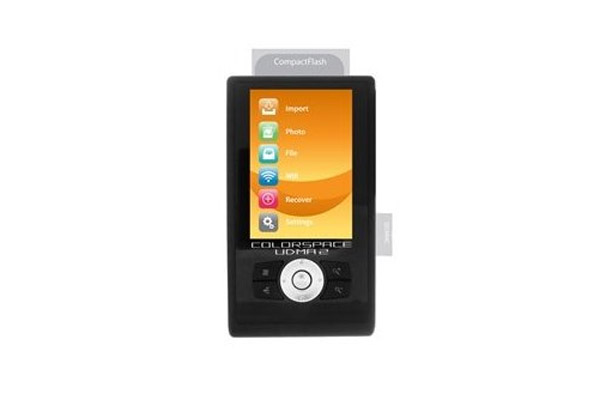
It’s not that difficult to calculate that with the price of $500, you get 1Gb of space for $1.
To compare, Transcend 400X – 64 GB Compact Flash Memory Card will cost around $100, which makes $1.56 for 1Gb of space.
But, there are quite a lot of slightly slower but considerably cheaper CF cards, and SD cards are even more affordable.
If you want my opinion, this kind of devices might fade away in some near future, but speaking about today, it might appear to be quite a good choice for travellers.
Moreover, even with a pack of CF cards you might want to back up your material, and that’s where HyperDrive comes handy.
And by the way I have not found too much counterparts on the web. So it’s either a monopoly, or a dying branch.
Just decide for yourself 🙂








I’m rather partial to my CompactDrive PD70X[1] with an 80 gig hard drive in it. Fast transfers off of my CF card and to my computer – fairly simple operation – and the best part about it is that it takes AA batteries. Which means if i’m out and about and i’ve shot enough to drain the batteries (which takes about 50 gig worth of transfer) I can just pop into a store and buy a set of batteries. In addition – if the batteries inside it are rechargeable and i plug it in – it’ll recharge the batteries internally. So it’s a AA battery charger and photo storage device and usb2 drive all in one! : )
–Dg
[1] http://www.compactdrive.com/product_info.php?products_id=31
Dang, where was this a few days ago? =)
I *just* ordered one not on your list… It’s “Portable Flash-HD” by MediaGear. It has readers for CF, SD, xD, SM, and MemStick.. I got a bare one, and you put your own 2.5″ laptop drive in it. One button transfer. THe hard drive to go in it has not yet arrived, but I’ll review it once it has.
It’s a storage only, but the price point is very attractive – I will have an 80 gig solution for about $110.
Back in march I purchased this unit (four-in-one digital media drive) by RIDATA I would recommend it but it is not 100% portable.
Here is what it is, Flash Memory to CD Burner, Digital Media Player, Multi-Card Reader/Writer and External CD-R/RW writer and it reads just about any memory card.
It dose not run on batteries so have to make sure that 120V is available.
I went on a cruise and downloaded my pictures on CD and by that I was able to free my 2GB SD Card and take more pictures like crazy.
Here is were I purchased it might be discontinued but many other units are available.
http://www.mydigitaldiscount.com
I would also like to throw the Hyperdrive portable storage device into the hat. I ordered one in March, took delivery about a month later, and last month, brought it with me on my weeklong fishing trip to Alaska. It’s not very sexy (no LCD screen to view photos), but very functional — transfer rates are quite fast and the battery life is very good. I didn’t bring a charger, and it transferred all of my photos (about 20 GB worth).
Wolverine is not a brand per se, they simply rebadge Vosonic products.
For me Vosonic was the best, PD70X looked too heavy for me.
I just came back from 2 weeks in Utah’s national parks where I took tons of photos. I simply got my wife’s and my SD cards (about 1.5 Gb) burned to a DVD while on vacation for $19. I made sure the photos looked good on the disk before paying for it. Yes, having my own device would have been handier, but I’m not sure I’d totally trust a unit that didn’t have a viewscreen. And I’m not at the point of spending $200-300 for something that does.
I also tried uploading my shots to a network storage website, but that was too darn slow from my hotel’s public PC.
I’m with Stew on just burning to CD/DVD. Unless you’re really in the middle of nowhere you’ll usually find a net cafe that will let you dump the contents of your mem card to an optical disk, and you can even get a duplicate copy and verify that they’re all on there yourself on a PC before you leave. This is what I’ve done on every trip.
I would remove the Coolwalker since it is no longer available from Nikon new.
I would add near the top of the list the JOBO GVP040 Giga Vu Pro (40GB). It’s features are equivalent to the EPSON P-4500 and the reviews state the card transfer rate is much faster than the Epson.
I think one key criteria left out is speed! I went with the PD70x because it will dump 1 gig of pics in less then 2 minutes usually. When I’m out and about, I just want to shoot and keep shooting! By keeping the hd in a padded pocket on my chest i can slip the card into the HD and a 2nd card into the camera and just keep swapping them as needed without any delay. Last week I shot 9gigs of pics in 1 day, and it worked perfectly! If I wanted to see the pics, I stuck the card in my PDA and used PocketLoupe, but for the most part, I am not looking for a portable media player, just a fast storage dump. Also having rechargeable AA’s is a major plus too. I use energizer 2500’s and I can go through about 50-80 gigs before I change them.
I’d like to recomend the Iaudio X5 L. It’s mostly an MP3 player but has USB on-the-go capability and links to my card reader and camera allowing me to upload images and view them, not to mention the 35 hour battery life.
If you need speed, reliability and quality for your money, then go with compactdrive. I’ve been using the PD70x with a Nikon D70s and a D200 for half a year now. no complaints, great performance (around 40 Gb transfer with a set of batteries). The newer version seems to be even better!
The Nexto is the best portable hard drive I’ve found:
http://www.jaldigital.com.au/catalog/product_info.php?cPath=27_106&products_id=380
– whatever size drive you like
– 1 Gb transfer in less than a minute
– accesory battery increases life to at least 80Gb worth of transfers
I use two and do a double backup of every card as they come out of the camera. They do slow down a bit if they are really loaded up, but for a professional shooting loads of data, these are perfect.
Good reviews. I was about to go with the wolverine, but then I found the MoFoto, which does about the same thing but was cheaper.
http://www.momentadevices.com/
I’ve only had it a few weeks, but it works great. I got the 500GB model.